Inhaltsverzeichnis
Variation Manager
Variation Manager
The variation manager can be opened in the main menu of SIGMA with
- the button Vary process
- a double-click on Variations in the window Project data
- the menu (Path: Experiment data > Variation manager)
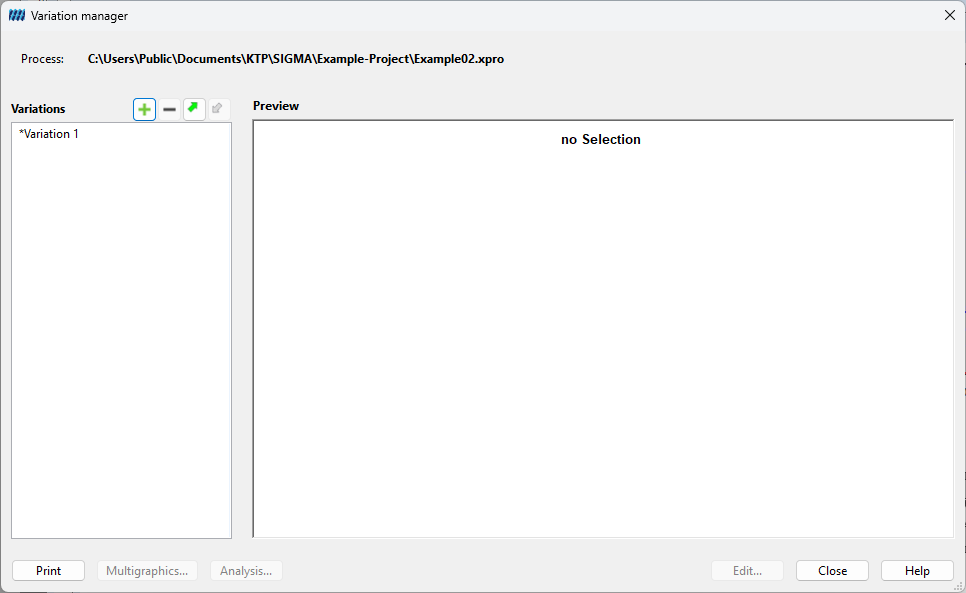
With the help of the variation manager the variation assigned to a process can be administrated, i.e. created, opened or deleted.
If variations of the process have already been chosen, these are listed in the window Variations. After clicking on the name of the variation the related details are shown in the window Preview. In addition, the multi graphic for an already existing variation can be directly opened (button Multi graphic…) or the experimental design can be printed (button Print…).
If no variations exist for the process, both windows are empty.
Create variation
Path: Click on the button with the green plus > Enter the name of the variation > Click on the button Open
Open variation
Path: Double-click on the name of the variation in the window Variations
or
Path: Click on the name of the variation in the window Variations > Click on the button Edit…
Delete variation
Path: Click on the name of the variation in the window Variations > Click on the button with the red minus