Dies ist eine alte Version des Dokuments!
Pure Polymers
Polymers
Path: Main menu > Material > New polymer… Tab: General
Path: Main menu > Material > Edit material (file)… Tab: General
The menu Material contains all topics to enter and edit material data. In any case the dialog shown in the figure opens. Here you can enter and/or edit all material data required for the simulation. The data are split up into General, Thermodynamic
data, Densities and Rheological data. To load a material from or save it to a file or database, use the icons bottom right (cf. chapter Load and Save). Furthermore the options Restore, Open Data base/Data set, Open file and Save can be chosen.
Save as… saves the data to a selectable file and Save as… saves data in a file.
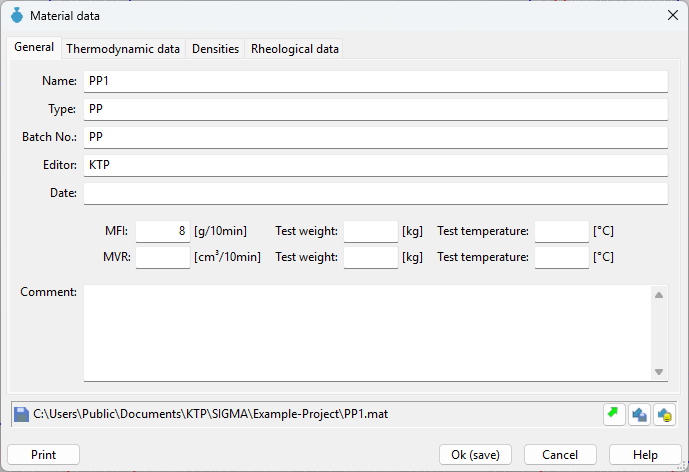 Figure: Dialog box Material data
In the tab General the following material data can be edited:
- Name: Name of the material
- Type: Type of the material
- Batch No.: Individual batch number for each material
- Editor: Name of the editor
- Date: Date on which the material data was entered
- Comment: eventual comment of the editor