Dies ist eine alte Version des Dokuments!
User-defined Function
Besides the above described build-in calculations, SIGMA offers the user to define his own functions to be calculated. These user defined functions are defined in a purpose build mini-language. The results calculated by such user defined functions are treated as any other result and can be viewed in diagrams or as result list.
Manage a User-defined Function
Path: Main menu: Simulation > User-defined functions…
By choosing Simulation, User-defined functions a dialog for managing user defined functions opens. Here a user can create, edit and delete existing user defined functions.
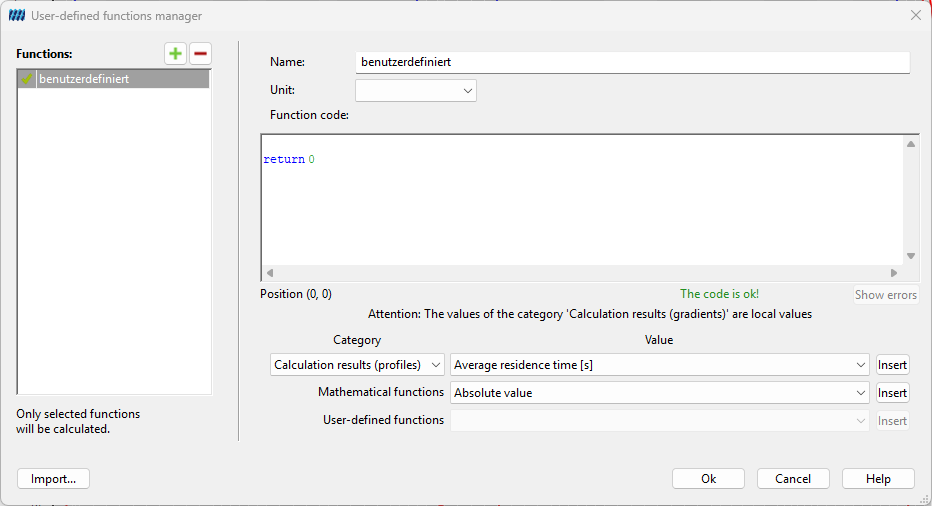
At the top a name for this function and a unit for the return value of the function have to be defined. Once a name is defined it can not be changed in subsequent editing steps.
The middle part of the dialog contains a text field for defining the function. The text in this field is syntax highlighted according to the syntax of user defined functions, for example keywords are colored blue. More to the syntax of user defined functions can be found in the section Define a User-defined Function.
In the lower part, pre-defined variables can be easily chosen and inserted in the text of the user defined function. There are about 150 predefined variables such as calculation results, geometrical data, materials and process parameters that can be used in user defined functions.
By clicking Ok, the given function is tested in view of the syntactical correctness. If there are syntactic errors, these errors will be displayed and the position in the text field will be marked accordingly.
Mathematic Expressions
A mathematic expression represents a single value. In such expressions variables, basic arithmetic operators, predefined functions and brackets can be used. The following enumeration summarizes what may be used in such mathematic expressions with regard to the rules of the user defined functions:
- Binary operators: There are five binary operators defined. These are the operators for raising the power(^), multiplication(*), division(/), addition(+) and subtraction(-).
- Unary operator: The unary minus (-) is defined.
- Brackets: Brackets can be used to parenthesize mathematical expressions.
- Variables: The user may declare and use own variables. Additionally, there are about 150 predefined variables.
- Predefined functions: Thirteen predefined functions like sin and the log can be used.
- User defined functions: already defined functions can be used, too.
For user defined functions some special precedence rules and rules for associativity take place to avoid ambiguities.
Operator Precedence
The operators “*” and “/” have precedence over “+” and “-”.
The power operator ”^” has higher binding strength than the other operators.
Functions have the greatest binding strength.
Parenthesizes expressions are evaluated first.
Associativity
All binary operators are left-associative. That means, terms of more than one operators of the same precedence are evaluated from left to right.
Examples
| $a^3+b^2+0.815$ | valid expression |
| $42+(-7)$ | valid expression (unary minus) |
| $\frac{a}{b}/3$ | valid expression, evaluated as $\frac{a/b}{3}$ (left-associative) |
| $\sin(2) \cdot 3.1415$ | valid expression, evalutared ast $(\sin 2) \cdot 3.1415$ higher binding-strength of functions |
| $\sin(2 \cdot 3.1415)$ | valid expression |
| $x^{1/2}$ oder $\sqrt{x}$ | valid expression, square-root of x |