Dies ist eine alte Version des Dokuments!
User-defined Function
Besides the above described build-in calculations, SIGMA offers the user to define his own functions to be calculated. These user defined functions are defined in a purpose build mini-language. The results calculated by such user defined functions are treated as any other result and can be viewed in diagrams or as result list.
Manage a User-defined Function
Path: Main menu: Simulation > User-defined functions…
Here a user can create, edit and delete existing user defined functions.
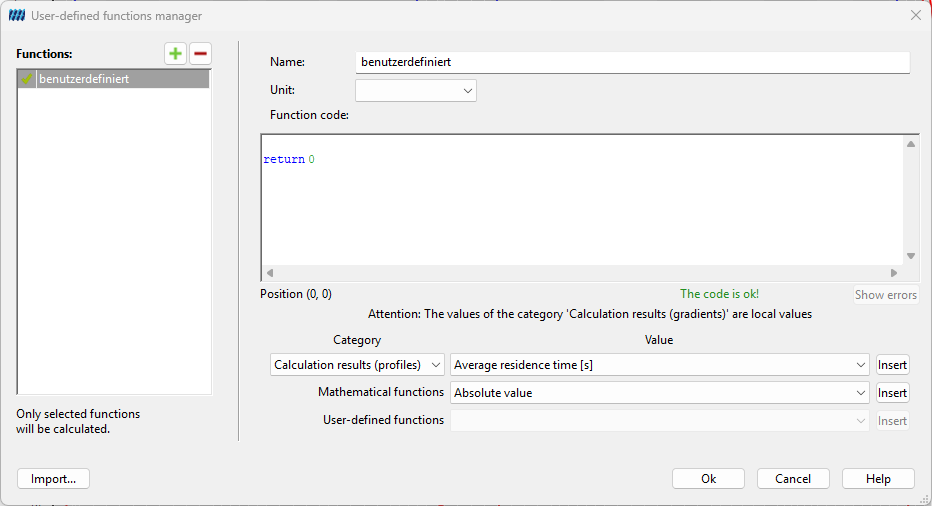
At the top a name for this function and a unit for the return value of the function have to be defined. Once a name is defined it can not be changed in subsequent editing steps.
The middle part of the dialog contains a text field for defining the function. The text in this field is syntax highlighted according to the syntax of user defined functions, for example keywords are colored blue. More to the syntax of user defined functions can be found in the section Define a User-defined Function.
In the lower part, pre-defined variables can be easily chosen and inserted in the text of the user defined function. There are about 144 predefined variables such as calculation results, geometrical data, materials and process parameters that can be used in user defined functions.
By clicking Ok, the given function is tested in view of the syntactical correctness. If there are syntactic errors, these errors will be displayed and the position in the text field will be marked accordingly.
Mathematic Expressions
A mathematic expression represents a single value. In such expressions variables, basic arithmetic operators, predefined functions and brackets can be used. The following enumeration summarizes what may be used in such mathematic expressions with regard to the rules of the user defined functions:
- Binary operators: There are five binary operators defined. These are the operators for raising the power(^), multiplication(*), division(/), addition(+) and subtraction(-).
- Unary operator: The unary minus (-) is defined.
- Brackets: Brackets can be used to parenthesize mathematical expressions.
- Variables: The user may declare and use own variables. Additionally, there are about 150 predefined variables.
- Predefined functions: Thirteen predefined functions like sin and the log can be used.
- User defined functions: already defined functions can be used, too.
For user defined functions some special precedence rules and rules for associativity take place to avoid ambiguities.
Operator Precedence
- The operators * and / have precedence over + and -.
- The power operator ^ has higher binding strength than the other operators.
- Functions have the greatest binding strength.
- Parenthesizes expressions are evaluated first.
Associativity
All binary operators are left-associative. That means, terms of more than one operators of the same precedence are evaluated from left to right.
Examples
| $a^3+b^2+0.815$ | valid expression |
| $42+(-7)$ | valid expression (unary minus) |
| $\frac{a}{b}/3$ | valid expression, evaluated as $\frac{a/b}{3}$ (left-associative) |
| $\sin(2) \cdot 3.1415$ | valid expression, evalutared ast $(\sin 2) \cdot 3.1415$ higher binding-strength of functions |
| $\sin(2 \cdot 3.1415)$ | valid expression |
| $x^{1/2}$ oder $\sqrt{x}$ | valid expression, square-root of x |
Logical Expressions
A logical expression represents a single logical value( as ”true” or ”false”). In such an expression comparison operators as well as the logical operators and and or may be used.
Comparison operators compare two (values of) mathematical expressions and return a logical value, which can be further combined by the two defined logical operators. The six comparison operators defined are: Less(<), less-or-equal ( < = ), equal ( == ), greater-or-equal ( >= ), greater (>) and unequal ( != ).
Logical expressions can neither be parenthesized nor their values stored in variables and retrieved later. The use of logical expressions is limited to conditional statements, which are explained in the section Statements.
Examples
| $a < 0$ | valid expression, true if is $a$ negative |
| $0.5 < a \land a \leq 1$ | true, if is in $a \in (0.5, 1]$ |
| $a \lor b$ | invalid, logical values can not be stored in variables |
| $|0-a| < \varepsilon$ | valid, operands are mathematical values |
Statements
The expressions described above cannot stand alone, but can only be used in conjunction with instructions. Four different instructions are used for user-defined functions. Each instruction begins on a new line and must be completed at the end of a line.
Assignments
An assignment binds the value of a mathematical expression to a variable. Therefore, on the left hand side of the assignment sign ( = ) is the variable and on the right hand side a mathematical expression. The syntax is as follows:
<Identifier> = <mathematical expression>
By using an assignment with an unknown identifier, a variable is created and initialized with the value of the given mathematical expression. The variable can be used later in mathematical expression to retrieve their value. The identifier has always to start with a letter, but numerals may be contained in the variable identifier. The value of logical expression cannot be bound to variables!
In the following a few examples to assignments:
| $\pi = 3.1415$ | valid assignment |
| $ab2 = a^2 + 2ab + b^2$ | valid assignment |
| $soNicht = (a < 0)$ | invalid, $a$ logical value can not be bound to variables |
| $a = b = 0.0$ | invalid, only single assignments are allowed |
| $2Pi = 2 + \pi$ | invalid, the identifier needs to start with a letter |
Return
A return statement determines the return-value of the user defined function. The evaluation of the function stops and the function is exited with the given return-value. The syntax is as follows:
return <mathematical expression>
Conditional Statement
An if-then-else statement evaluates a statement dependent on a given condition. This condition is expressed as a logical expression following the keyword if. If the condition holds, the statement following the then-keyword is evaluated, and otherwise the else denoted statement. The else-case is optional. If no else is given, simply the then denoted statement is not evaluated. The syntax is as follows:
if <logical expression> then <statement> [ else <statement> ]
As a simple example the determination of the maximum of two values is shown below:
if a < b        # Wenn a kleiner als b ist
then           # Dann
  max= b       # Ist b das Maximum
else           # Sonst
  max= a       # Ist a das Maximum
Grouping Statements
The keywords begin and end parenthesize a sequence of statements. This group of statements can be evaluated as a single statement, for example in a conditional statement, where one of cases needs more than one single statement to work properly. The syntax is as follows:
`begin´
<statement 1>
...
<statement n>
`end´''
Further Information for Use of User-defined Functions
Importance of Lines
By defining user defined functions each statement, except the if-then-else statement, which consists of more than one line, has always to cover a single line. Due to that there is no special end-marker (like ”;”) for statements, the end of line terminates a single statement. As expressions are an inherent part of statements they are also terminated by the end of line.
Variables
Only mathematical values can be bound to variables. There are no variables for storing and retrieving logical values. Variables don’t have to be declared, like in other languages. By using an unknown identifier a variable is created, that can further be used. If the first use of an unknown identifier on the left hand side of an assignment, the variable is initialized with the given value. If the first occurrence of an identifier is an expression, the variable will be created, but their value is invalid.
Predefined Variables
Any user defined function is evaluated by SIGMA for a single grid point in the calculation core. Some data at these grid points like geometry data, data of the used material, process parameters and results can be accessed by user defined function through the use of predefined variables, which are created and initialized by SIGMA. There are 144 of such predefined variables which can be easily used in user defined functions (see figure).
Operators
In the following table all useable operators are listed. Operators with higher precedence listed before operators with lower precedence.
| # | Name | Zeichen | Beschreibung | Kategorie |
|---|---|---|---|---|
| 7 | Power | ^ | Raises the left operand to the power of the right operand | mathematical |
| 6 | Negation | - | Negates the operand to the right | mathematical |
| 5 | Multiplication | * | Multiply the left and right operand | mathematical |
| 5 | Division | / | Divides the left operand by the right one | mathematical |
| 4 | Addition | + | Add the right operand to the left one | mathematical |
| 4 | Subtraction | - | Subtract the left operand by the right operand | mathematical |
| 3 | Less | < | Test if the left operand is less than the right | mathematical→ logical |
| 3 | less-or-equal | <= | Test if the left operand is less or equal to the right operand | mathematical → logical |
| 3 | Equal | == | Test the operands equality | mathematical→ logical |
| 3 | Greater-or-equal | >= | Test if the left operand is greater or equal to the right operand | mathematical → logical |
| 3 | Greater | > | Test if the left operand is greater than the right operand | mathematical → logical |
| 3 | Unequal | != | Test if the operands are not equal | mathematical → logical |
| 2 | Logcial and | and | Test if the operands are not equal | logical |
| 1 | Logical or | or | Test if the left or the right or both are true | logical |
Build-in Functions
Fourteen build-in functions may be used in mathematical expressions. Each of them takes a single parameter, which is directly following the identifier of the function. Such functions have higher binding strength than the power-operator. The following table lists all these build-in functions.
| Name | Zeichen | Beschreibung |
|---|---|---|
| Sine | sin | Computes the sine, parameter in rad |
| Cosine | cos | Computes the cosine, parameter in rad |
| Tangent | tan | Computes the tangent, parameter in rad |
| Arcus Sine | asin | Computes the arcsin in rad |
| Arcus Cosine | acos | Computes the arccos in rad |
| Arcus Tangent | atan | Computes the arctan in rad |
| Sine hyperbolicus | sinh | Computes the sinh in rad |
| Cosinus Hyperbolicus | cosh | Computes the cosh in rad |
| Tangens Hyperbolicus | tanh | Computes the tanh in rad |
| Decadic logarithm | log | Computes the logarithm with the basis 10 |
| Logarithm Naturalis | ln | Computes the logarithm with basis $e$ |
| Absolute value | abs | Computes the absolute value of the parameter |
| Square root | sqrt | Computes the sqaure root of the parameter |
Evaluation of User-defined Functions
A user-defined function is evaluated for each grid point. It therefore delivers exactly one function value for each grid point. All the values together can afterwards be graphically depicted in a user-defined diagram. As described above predefined variables can be used in the function to represent specific values for this grid point. The user-defined functions are only used after the standard calculations and do not influence them.
Invalid Values
Not all predefined variables have a valid value bound to them, as the predefined variables are the same for each grid point, but not all data is defined for each grid point. For instance the number of discs (of a kneading block) is a predefined variable but their value is only defined for grid points that represent a location at the screw where a kneading block is located. In all other cases the value of such a predefined variable is invalid. Also some operators are not defined for all operands (Division by zero). Because of that, a special value denoting not defined values exists for user defined functions. This value is bound to the predefined variable invalid. Operators taking an invalid value as one of their parameters, return themselves the invalid value as result. This invalid value is also a valid return value for the user defined function, in that case no result is shown for the according grid point.