Calculation
Path: Main menu: Simulation > Calculation settings..
The item Simulation, Calculation settings in the menu contains all options for managing calculation settings. When choosing this item, the window shown in the figure opens up.
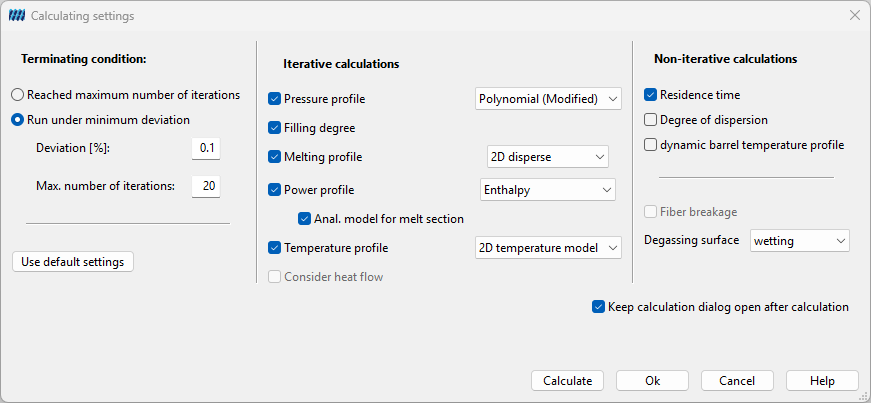
Calculations are chosen by marking the belonging check boxes. Some of the options are related to another one. Due to that some check boxes are marked by setting another option. Moreover the pressure profile is marked automatically, because of that it is the basis for all further calculations.
The calculations are done iteratively. The user can choose either to determine a number of iterations for SIGMA to accomplish or to give a deviation [%] and a maximum number of iterations. When the results of the current calculation section differ less from the previous section than given the calculation will be finished. If the deviation is not achieved after accomplishing the maximum number of iterations the calculation will be finished, too.
It is not possible to perform a calculation as long as the machine data, configuration data, material data and process parameters are not defined completely. In case of incompleteness or in case that these data are not reasonable the matching settings can not be marked.
A calculation is started by clicking on the button Calculate. After that the results can be viewed in a diagram or as result list. Both options are placed in the menu at the item Diagrams. There are placed all diagrams, for instance temperature profile and melting profile. The other way to activate one of the diagrams is to activate it with help of the belonging icons.

| 1. Melting Process | 2. Dispersion Quality and Energy Density | 3. Pressure and Fill Level |
| 4. Degassing Surface | 5. Channel Volume | 6. Power Curve |
| 7. Temperature Profile | 8. Residence Times and Mixing Coefficient | 9. Heat Flow |
| 10. User-Defined Functions | 11. Tool Calculation Results | 12. Create and Edit User-Defined Functions |
| 13. Create New Numerical 3D Simulation | 14. Display Numerical 3D Simulation Results | 15. Manage Numerical 3D Simulation |
| 16. Open Calculation Results Table | 17. Open New Multigraph |
The result lists are placed in the menu at
Path: Main menu: Simulation > View results.
Additionally, there are placed the commands for saving and exporting these lists.
Path: Main menu: Simulation > Save results as…
Path: Main menu: Simulation > Export results..
Calculation Settings
The following calculations can be chosen in SIGMA:
- Pressure profile (s. Melt Conveying)
- Filling degree
- Melting profile (s. Melting Calculation)
- Power profile (s. Torque and Power Consumption)
- Temperature profile (s. Melt Temperature)
- Consider an optional heat flow
- Residence time distribution (s. Residence Time Distribution)
- Degree of dispersion (s. Degree of Dispersion)
All settings for the calculation are defined in the dialog Calculation Settings.
- Pressure profile: Within this calculation it can be chosen between the polynomial (s. Linear Pressure Model) the linear (s. Polynomial Pressure Model) and a regression calculation model (s. Regression Model). The linear one bases on an analytical approach based on the theory of single screw extruders. Against this the polynomial calculation and the regression model base on an approximation of numerical results. By selecting the modified option the treatment of the nip region in the calculation can be chosen. From our experience the regression model that was newly implemented in SIGMA 4.5 gives the most reliable results.
- Melting profile: Within this calculation it can be chosen between five different models: Compacted, Disperse, Binary, Modified Disperse and 2D Disperse. The compacted calculation model is a modified Tadmor model as it is known in the theory of single screws (s. Compacted Model). The disperse model presumes that the granulate melts isolated (s. Disperse Model). The binary model takes the melting of binary systems (blends and compounds) into account. The modified dispersed melting model is based on the dispersed model. However, the finite influence duct dimension, the influence of the convection as well as the influence of the particles on the stream will be included additionally within this model (s. Modified Disperse Model). The 2D disperse melting model is a further expansion of the modified disperse melting model and is recommended for the calculation of the melting of particles bigger than 2 mm (s. 2D Disperse Model).
- Temperature profile: Within this calculation it can be chosen between a traditional rectangular model (s. Traditional Rectangular Model), a new twin screw model (s. Modified Twin Screw Model) and a 2D temperature model (s. 2D Temperature Model). If a heat flow (s. Heat Flow) is considered for the temperature calculation, SIGMA adapts the barrel temperature.
- Power profile: Within this calculation it can be chosen between a traditional rectangular model (s. Rectangular Model), a new twin screw model (s. Modified Twin Screw Model), an enthalpy based model (s. Enthalpy Based Model) and an enthalpy based model with heat flow (s. Enthalpy model with heat flow).